


WAVES-14332771
Description
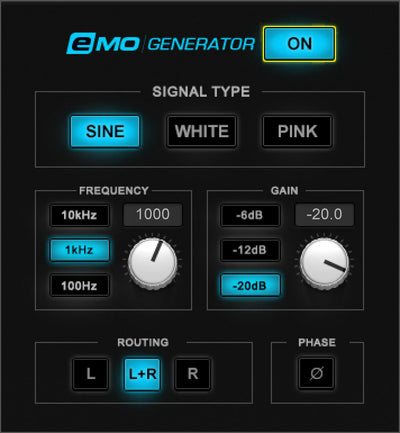
A test tone generator may not be glamorous… but it sure is useful. When used with a spectrum analyzer (like those in the F6 GEQ and H-EQ) pink noise reveals filter curves differences among EQ designs and distortion components. Or gate sine waves or noise to supplement drum sounds. Mix in pink noise to emulate listening to mixes while driving.
Use sine waves to find room resonances ring out PA systems check your hearing and more—don’t miss out on this useful tool.
Features: Use with a spectrum analyzer to analyze filter curves Supplement acoustic snares with gated pink noise Emulate the effect of listening to mixes while driving in a car Included with the Waves eMotion LV1 live mixer Gate sine wave with sidechained kick for “hum drum” kick sounds Analyze distortion components using sine waves Check mono and stereo phase integrity Requirements: Platform CPU RAM Disk Notes Additional Requirement Audio Card Ports Internet Required 32 Bit Support 64 Bit Support Plugins mac https://www.waves.com/plugins/emo-generator#tab-tech-specs|tab-sys-req:~:text=Intel%20or%20Silicon%20Architecture 8 16 Minimum: 1024x768 Recommended: 1280x1024 / 1600x1024 USB displays are not supported as the primary display.
Specs

 This product
Waves eMo Generator: Audio Generation Plugin
WAVES
Rs. 2,822 |
 Kuassa Efektor DS3603 Distortion – Professional Audio Software & Plugin
KUASSA
Rs. 2,823 |
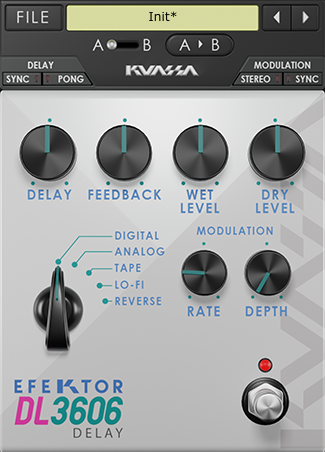 Kuassa Efektor DL3606 Delay – Professional Audio Software & Plugin
KUASSA
Rs. 2,823 |
 Kuassa Efektor CP3603 Compressor – Professional Audio Software & Plugin
KUASSA
Rs. 2,823 | |
|---|---|---|---|---|
| Platform | Mac, PC | Mac, PC | Mac, PC | Mac, PC |
| OS Requirements - Mac | macOS Catalina 10.15, Big Sur 11, Monterey 12, Ventura 13, Sonoma 14 | Mac OSX 10.11 or later (64 Bit). | Mac OSX 10.11 or later (64 Bit). | Mac OSX 10.11 or later (64 Bit). |
| Hardware Requirements - Mac | https://www.waves.com/plugins/emo-generator#tab-tech-specs|tab-sys-req:~:text=Intel%20or%20Silicon%20Architecture, 8 GB RAM, 16 GB free disk space | Core2 Duo, or better (latest Intel i3 recommended), 4 GB RAM | Core2 Duo, or better (latest Intel i3 recommended), 4 GB RAM | Core2 Duo, or better (latest Intel i3 recommended), 4 GB RAM |
| OS Requirements - PC | Windows 10 64 bit and Windows 11 | Windows Vista or Later (64 bit) | Windows Vista or Later (64 bit) | Windows Vista or Later (64 bit) |
| Hardware Requirements - PC | X64 compatible Intel or AMD CPU, 8 GB RAM, 16 GB free disk space | Core2 Duo, or AMD Phenom ii X4 or better (latest Intel i3, AMD A4, or better is recommended), 4 GB RAM | Core2 Duo, or AMD Phenom ii X4 or better (latest Intel i3, AMD A4, or better is recommended), 4 GB RAM | Core2 Duo, or AMD Phenom ii X4 or better (latest Intel i3, AMD A4, or better is recommended), 4 GB RAM |
| Additional Compatibility | Minimum: 1024x768 Recommended: 1280x1024 / 1600x1024 USB displays are not supported as the primary display. Minimum: 1024x768 Recommended: 1280x1024 / 1600x1024 | Please note that this product is a plugin, a VST/VST3/AU/AAX compatible host/sequencer is needed to run this software | Please note that this product is a plugin, a VST/VST3/AU/AAX compatible host/sequencer is needed to run this software | Please note that this product is a plugin, a VST/VST3/AU/AAX compatible host/sequencer is needed to run this software |
| Plug-in Formats | — | VST-2, VST-3, AU, AAX | VST-2, VST-3, AU, AAX | VST-2, VST-3, AU, AAX |